
Introduction
Contents
Introduction#
Welcome to FlashKit 101#
We are going to cover a number of topics from installation to use of configuration files.
Outline
Installation of FlashKit
Ways to use FlashKit
Using the FlashKit create tools
Configuration Files
The FlashKit python interface
More detailed information is available in subsequent tutorials and the api documentation.
Let’s get started#
In order to install and use FlashKit, you at least need python 3.7 or above.
Run the following commands to retrieve and install the FlashKit library:
cd <path to install location>
git clone git@github.com:GWU-CFD/FlashKit.git
pip install -e FlashKit
The ‘-e’ option in the installation line allows us to update the local git repository with
the git pull command, such as when there is a new release of FlashKit, without reinstalling
the repository each and every time we would like to update the repository.
If you have difficulty cloning the repository, make sure you both have access to FlashKit and that your ssh key settings are properly configured with github for the machine you are using.
What’s there for us#
There are a number of ways to interact with the FlashKit library.
Commandline
Commandline with config files
Python code
The first and foremost intended use of the FlashKit library is from the commandline, with or without using configuation files. FlashKit can also be used from python code with virtually the same interface as the commandline.
Note
FlashKit understands where you are running the commands from (i.e., your current working directory). This brings us to the introduction of configuration files. FlashKit is intended to work with a directory tree of simulation files where the structure of directories has meaning as shown in the example below. This being the case, FlashKit will use the available configuration files in the current working directory and all those directories above to infer the intended options for the FlashKit command of interest. Specifically, you can either enter options for the FlashKit command at the commandline or in any of the configuration files in the path. We will get back to the details of how to most effectively use configuration files shortly.
A FlashKit command looks like the following:
$ flaskit create xdmf --auto
Creating xdmf file from 26 simulation files
plotfiles = ./INS_LidDr_Cavity_hdf5_plt_cnt_xxxx
gridfiles = ./INS_LidDr_Cavity_hdf5_grd_xxxx
xdmf_file = ./INS_LidDr_Cavity.xmf
     xxxx = [0,1,2,3,4, ...]

Writing xdmf data out to file ...
|████████████████████████████████████████| 26/26 [100%] in 0.6s (41.65/s)
|████████████████████████████████████████| 0 in 0.5s (0.00/s)
You may see a different output if there are no FLASH simulation output files in your current working directory.
This command will create an xdmf file for use in plotting FLASH simulation output using Paraview (or other visualization software which understands xdmf + hdf5 files). The auto flag tells FlashKit to attempt determining what simulations files you want to use in creating the xdmf file. Specifically, it will look for all FLASH simulation plot files which conform to the standard naming convention. Many options and flags can be provided for each FlashKit command. These options and flags change the behavior of the underling FlashKit operations provided in the library. You can see what options are available by running the FlashKit command with the help flag or usually by providing no options to the FlashKit command.
To see the options available for the xdmf command, use the following:
$ flashkit create xdmf --help
usage: flashkit create xdmf BASENAME [<option> VALUE, ...] [<switch>, ...] [<flag>, ...]
Create an xdmf file associated with flash simulation HDF5 output.

arguments:
BASENAME     STRING  Basename for flash simulation, will be guessed if not provided
                     (e.g., INS_LidDr_Cavity for files INS_LidDr_Cavity_hdf5_plt_cnt_xxxx)

options:
-b, --low    INT     Begining number for timeseries hdf5 files; defaults to 0.
-e, --high   INT     Ending number for timeseries hdf5 files; defaults to 0.
-s, --skip   INT     Number of files to skip for timeseries hdf5 files; defaults to 1.
-f, --files  LIST    List of file numbers (e.g., <1,3,5,7,9>) for timeseries.
-p, --path   PATH    Path to timeseries hdf5 simulation output files; defaults to cwd.
-d, --dest   PATH    Path to xdmf (contains relative paths to sim data); defaults to cwd.
-o, --out    FILE    Output XDMF file name follower; defaults to a footer ''.
-c, --plot   STRING  Plot/Checkpoint file(s) name follower; defaults to '_hdf5_plt_cnt_'.
-g, --grid   STRING  Grid file(s) name follower; defaults to '_hdf5_grd_'.
-q, --force  STRING  Plot/Checkpoint file(s) substring to ignore; defaults to 'forced'.

switches:
-A, --auto           Force behavior to attempt guessing BASENAME and [--files LIST].
-B, --find           Force behavior to attempt guessing [--files LIST].

flags:
-I, --ignore         Ignore configuration file provided arguments, options, and flags.
-O, --options        Show the available options (i.e., defaults and config file format) and exit.
-h, --help           Show this message and exit.

note:  If neither BASENAME nor either of [-b/-e/-s] or -f is specified,
       the --path will be searched for FLASH simulation files and all
       such files identified will be used in sorted order.
The power of creation#
FlashKit provides a number of useful operations for a FLASH user, which fall into several catagories. These are accessed in a very natural way by specifying the catagory and operations desired. A this time, the inteded scope of the FlashKit library looks like the following, where the clouds indicate functions that are not complete.
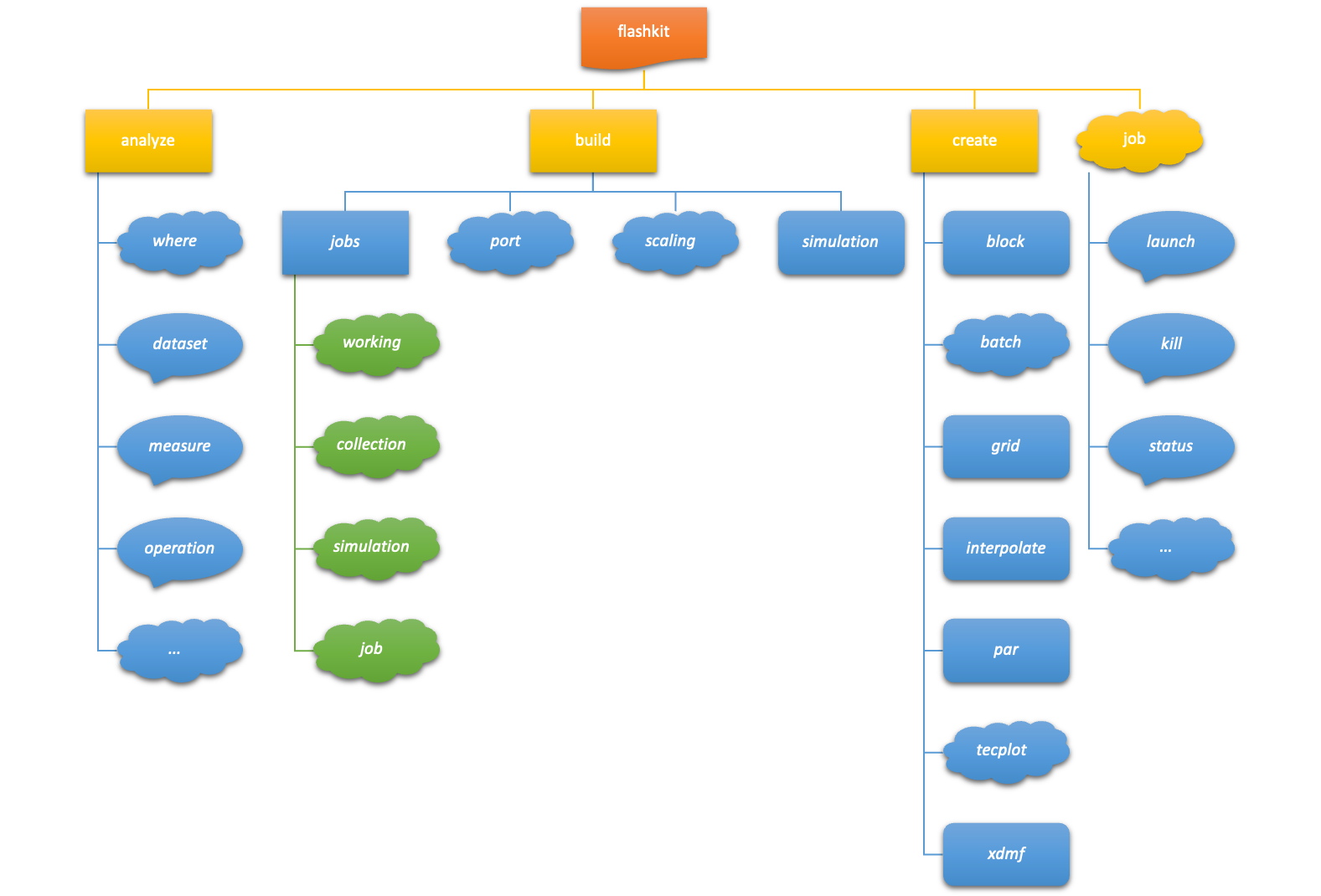
The available FlashKit categories and overall usage of FlashKit can be provided using the following:
$ flashkit --help
usage: flashkit [-h] [-v] [-V] <command> [<args>...]
Command-line tools for FlashKit.

commands:
analyze      Introspect simulation directories and analyze results simulation jobs
build        Perform actions related to building flash executables and directories
create       Create files relavent to flash execution and processing.
job          Launch and interact with currently executing or completed flash simulation jobs

options:
-h, --help        Show this message and exit.
-v, --version     Show the version and exit.
-V, --verbose     Enable debug messaging.
-P, --parallel    Indicate Parallel execution, useful for when flashkit
                  is executed from a job script and cannot determine
                  its parallel or serial execution status automatically.

files:              (Options are also pulled from files)
../**/flash.toml    Job tree configuration.
./flash.toml        Local configuration.

Use the -h/--help flag with the above commands to
learn more about their usage.

Documentation and issue tracking at:
https://github.com/GWU-CFD/FlashKit
The FlashKit library provides help information at all levels. This is useful as it can be quite difficult to remember all of the available options and flags for each FlashKit operation. It is convienent to be able to ask FlashKit for help before having to consult the FlashKit documentation.
Let’s test this out, the available create operations can be provided using the following:
$ flashkit create --help
usage: flashkit create [-h] <command> [<args>...]
Create files relavent to flash execution and processing.

commands:
batch       Create the appropriate flash execution shell script.
block       Create an initial simulation flow field (block) hdf5 file.
grid        Create an initial simulation domain (grid) hdf5 file.
interp      Create an initial flow field (block) using interpolated simulation data.
par         Create an flash parameter file using specified templates and sources.
tecplot     Create a tecplot readable files associated with flash simulation HDF5 output.
xdmf        Create an xdmf file associated with flash simulation HDF5 output.

options:
-h, --help  Show this message and exit.

Use the -h/--help flag with the above commands to
learn more about their usage.
That was helpful.
As we saw, the create catagory of operations helps us create useful files for interacting with FLASH simulations.
For example, the grid operation creates an initial simulation grid file that is needed when running FLASH simulations
which use a stretched regular grid. We already saw the xdmf operation and how it creates the necessary file to view
our FLASH simulation output using Paraview.
Let’s take a closer look at the grid operation and its options and flags:
$ flashkit create grid --help
usage: flashkit create grid [<option> VALUE, ...] [<flag>, ...]
Create an initial simulation domain (grid) hdf5 file.

options:
-D, --ndim     INT   Number of simulation dimensions (i.e., 2 or 3); defaults to 2.
-X, --nxb      INT   Number of grid points per block in the i direction; defaults to 64.
-Y, --nyb      INT   Number of grid points per block in the j direction; defaults to 64.
-Z, --nzb      INT   Number of grid points per block in the k direction; defaults to 64.
-i, --iprocs   INT   Number of blocks in the i direction; defaults to 1.
-j, --jprocs   INT   Number of blocks in the j direction; defaults to 1.
-k, --kprocs   INT   Number of blocks in the k direction; defaults to 1.
-x, --xrange   LIST  Bounding points (e.g., <0.0,1.0>) for i direction; defaults to [0.0, 1.0].
-y, --yrange   LIST  Bounding points (e.g., <0.0,1.0>) for j direction; defaults to [0.0, 1.0].
-z, --zrange   LIST  Bounding points (e.g., <0.0,1.0>) for k direction; defaults to [0.0, 1.0].
-B, --bndbox   LIST  Bounding box pairs (e.g., <0.0,1.0,...>) for each of i,j,k directions.
-a, --xmethod  STR   Stretching method for grid points in the i directions; defaults to uniform.
-b, --ymethod  STR   Stretching method for grid points in the j directions; defaults to uniform.
-c, --zmethod  STR   Stretching method for grid points in the k directions; defaults to uniform.
-q, --xparam   DICT  Key/value pairs for paramaters (e.g., <alpha=0.5,...>) used for i direction method.
-r, --yparam   DICT  Key/value pairs for paramaters (e.g., <alpha=0.5,...>) used for j direction method.
-s, --zparam   DICT  Key/value pairs for paramaters (e.g., <alpha=0.5,...>) used for k direction method.
-p, --path     PATH  Path to source files used in some streching methods (e.g., ascii); defaults to cwd.
-d, --dest     PATH  Path to intial grid hdf5 file; defaults to cwd.

flags:
-F, --nofile         Do not write the calculated coordinates to file.
-R, --result         Return the calculated coordinates.
-I, --ignore         Ignore configuration file provided arguments, options, and flags.
-O, --options        Show the available options (i.e., defaults and config file format) and exit.
-h, --help           Show this message and exit.
That is a lot of available options and flags for changing the behavior of the create grid operation.
Let’s test some of this out. For example, let’s try creating a grid with 2x4 blocks with 8x12 points each in the x and y directions.
Additionally let’s stretch the grid using a centered tanh method in the y direction. This is accomplished with:
$ flashkit create grid -X 8 -Y 12 -i 2 -j 4 -b tanh_mid -RF

Creating initial grid file from specification:
  grid_pnts = (16, 48)
  sim_range = (0.0, 0.0) -> (1.0, 1.0)
  algorythm = ('uniform', 'tanh_mid')
  grid_file = ./initGrid.h5
  with_opts =

Calculating grid data (no file out) ...

Coordinates are as follows:
x:
[0.     0.0625 0.125  0.1875 0.25   0.3125 0.375  0.4375 0.5    0.5625 0.625  0.6875 0.75   0.8125 0.875  0.9375 1.    ]

y:
[5.551115e-17 1.736147e-02 3.511072e-02 5.324168e-02 7.174719e-02 9.061900e-02 1.098478e-01 1.294229e-01 1.493330e-01
 1.695651e-01 1.901056e-01 2.109395e-01 2.320508e-01 2.534226e-01 2.750370e-01 2.968751e-01 3.189171e-01 3.411426e-01
 3.635303e-01 3.860582e-01 4.087039e-01 4.314444e-01 4.542564e-01 4.771162e-01 5.000000e-01 5.228838e-01 5.457436e-01
 5.685556e-01 5.912961e-01 6.139418e-01 6.364697e-01 6.588574e-01 6.810829e-01 7.031249e-01 7.249630e-01 7.465774e-01
 7.679492e-01 7.890605e-01 8.098944e-01 8.304349e-01 8.506670e-01 8.705771e-01 8.901522e-01 9.093810e-01 9.282528e-01
 9.467583e-01 9.648893e-01 9.826385e-01 1.000000e+00]
$ flashkit create grid -X 8 -Y 12 -i 2 -j 4 -b tanh_mid -RF
Creating initial grid file from specification:
grid_pnts = (16, 48)
sim_range = (0.0, 0.0) -> (1.0, 1.0)
algorythm = ('uniform', 'tanh_mid')
grid_file = ./initGrid.h5
with_opts =

Calculating grid data (no file out) ...

Coordinates are as follows:
x:
[0.     0.0625 0.125  0.1875 0.25   0.3125 0.375  0.4375 0.5    0.5625 0.625  0.6875 0.75   0.8125 0.875  0.9375 1.    ]

y:
[5.551115e-17 1.736147e-02 3.511072e-02 5.324168e-02 7.174719e-02 9.061900e-02 1.098478e-01 1.294229e-01 1.493330e-01
 1.695651e-01 1.901056e-01 2.109395e-01 2.320508e-01 2.534226e-01 2.750370e-01 2.968751e-01 3.189171e-01 3.411426e-01
 3.635303e-01 3.860582e-01 4.087039e-01 4.314444e-01 4.542564e-01 4.771162e-01 5.000000e-01 5.228838e-01 5.457436e-01
 5.685556e-01 5.912961e-01 6.139418e-01 6.364697e-01 6.588574e-01 6.810829e-01 7.031249e-01 7.249630e-01 7.465774e-01
 7.679492e-01 7.890605e-01 8.098944e-01 8.304349e-01 8.506670e-01 8.705771e-01 8.901522e-01 9.093810e-01 9.282528e-01
 9.467583e-01 9.648893e-01 9.826385e-01 1.000000e+00]
Notice that this time we used the short form of the options and the options and flags.
We will go into more details of the create catagory of operations in later tutorials.
What’s in a configuration#
The idea of configuration files, very similar to how FLASH implements a hierarchy of source units to provide inheritance, is to provide useful context to the library behavior based on where the command is exexuted from. Specifically, configuration files implement a depth first merge of options specified in these files; where config file options overwrite library defaults and commandline (or python interface) provided options overwrite config file options.
Consider the following directory structure typical of a FLASH researcher, and files within.
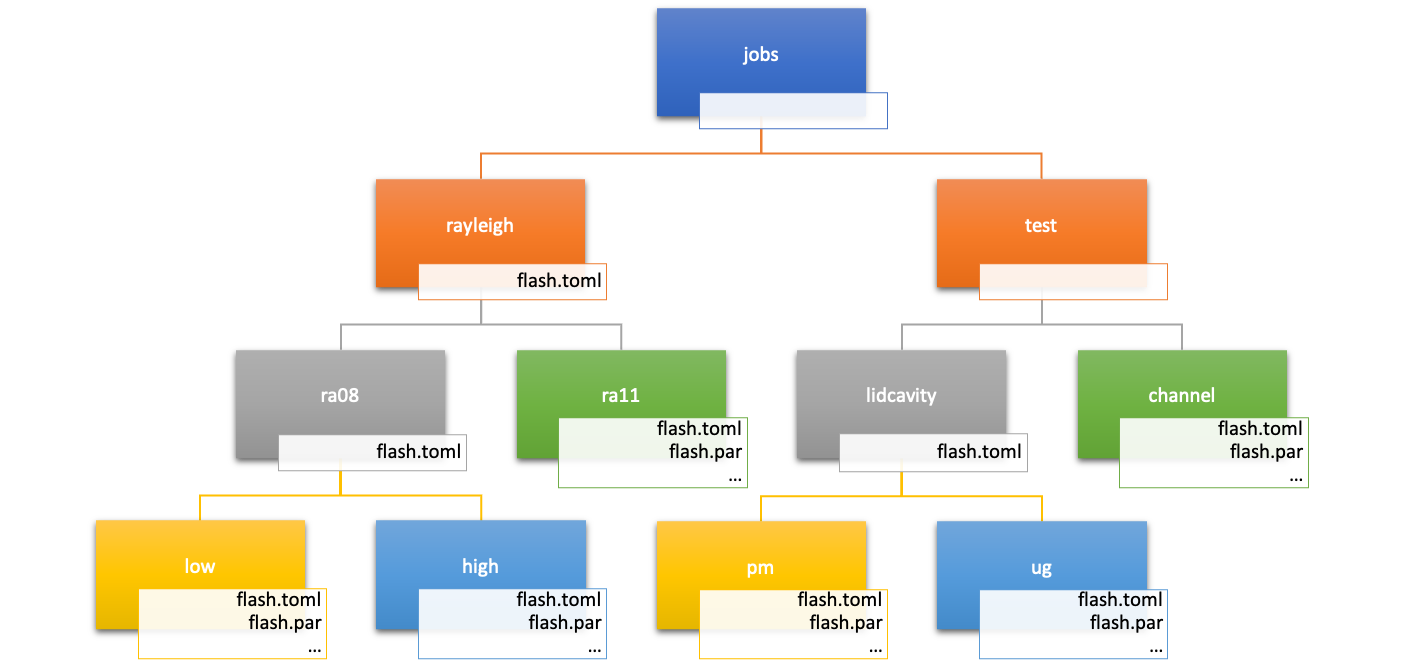
Using this directory structure as an example, if a flashkit command is run from the jobs/rayleigh/ra08/low/ directory, the
order of precidence (in decending order) for options will be:
command line options
jobs/rayleigh/ra08/low/flash.toml
jobs/rayleigh/ra08/flash.toml
jobs/rayleigh/flash.toml
library defaults
Configuration file options are specified in the toml file under the following structure:
[category.operation]
option = value
Now let’s use this hierarchy in a simple example to see how this might be useful with flashkit create grid.
At the highest level, jobs/rayleigh/, let’s say all simulations will use the same stretching method and domain:
At the the next level, jobs/rayleigh/ra08, let’s say all simulations will use the same number and size blocks:
At the lowest level, jobs/rayleigh/ra08/low, let’s say the specific simulation will use lower resolution:
These options will be combined, according to the precidence ordering above, allowing us to forego the options at the prompt. Let’s see this in action.
This is exactly as expected.
One final note on configuration file options. Several operations, and indeed operations across categories, may share some
options. Therefore, it is benificial to have a method to specify the common options such as grid and processor information.
For example, the highest level options, jobs/rayleigh/, could have been specified as:
In this case, the general option is used if the operation specific option is not provided in the configuration file. This leads to the more complete order of precidence (in decending order) for options being:
command line options
jobs/rayleigh/ra08/low/flash.toml (operation specific)
jobs/rayleigh/ra08/low/flash.toml (common options)
jobs/rayleigh/ra08/flash.toml (operation specific)
jobs/rayleigh/ra08/flash.toml (common options)
jobs/rayleigh/flash.toml (operation specific)
jobs/rayleigh/flash.toml (common options)
library defaults
The full specification for options providable in configuration files can be found here.